JavaScript Data Types and Type Coercion
JavaScript Type System Overview
JavaScript uses a dynamically typed, weakly typed, runtime-evaluated type system.
- Dynamic: variable types are determined at runtime, not at declaration
- Weak: implicit type conversion (coercion) is allowed
- Runtime-based: type errors often appear during execution, not compilation
let x = 10;      // number
x = "10";       // string
x = true;       // boolean
No static type locking exists at the language level.
Classification of Data Types
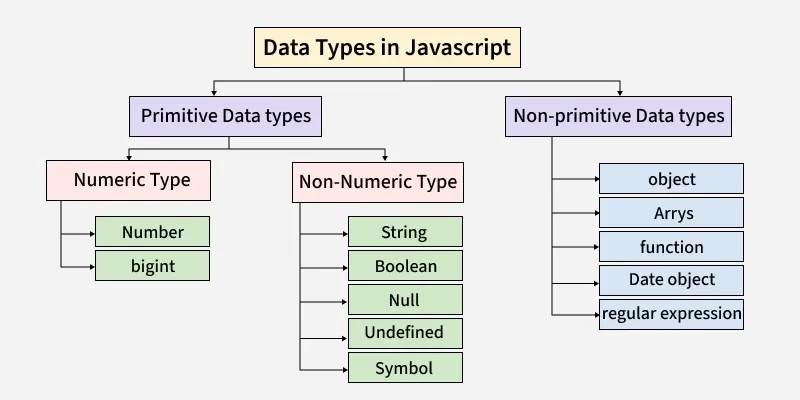
JavaScript data types are divided into:
Primitive Types (Immutable, Passed by Value)
numberbigintstringbooleanundefinednullsymbol
Non-Primitive (Reference Type)
object- plain objects
- arrays
- functions
- dates
- maps / sets
- regex
Primitive Types in Depth
number
IEEE-754 double-precision floating point (64-bit).
let a = 10;
let b = 10.5;
let c = -3;
let d = Infinity;
let e = NaN;
Properties
- No integer vs float distinction
- Precision limit: 2⁵³ − 1
NaNis a number type
typeof NaN;           // "number"
Number.isNaN(NaN);    // true
NaN === NaN;          // false
Precision Pitfall
0.1 + 0.2 === 0.3; // false
bigint
For integers larger than Number.MAX_SAFE_INTEGER.
let x = 9007199254740993n;
Rules:
- Must use
nsuffix - Cannot mix with
number
10n + 5n;   // valid
10n + 5;    // TypeError
string
Immutable UTF-16 encoded sequence.
let s1 = "hello";
let s2 = 'hello';
let s3 = `hello ${2 + 2}`;
Immutability:
let s = "abc";
s[0] = "z";
console.log(s); // "abc"
boolean
Two values only.
true
false
Often produced implicitly via coercion.
undefined
Indicates absence of assignment.
let x;
x === undefined; // true
Returned when:
- variable declared but not assigned
- function returns nothing
- accessing missing object property
null
Explicit intentional absence of value.
let y = null;
Historical bug:
typeof null; // "object"
symbol
Unique, immutable identifiers.
let id = Symbol("id");
let id2 = Symbol("id");

id === id2; // false
Used for:
- hidden object properties
- meta-programming
- avoiding name collisions
Non-Primitive Type: object
Everything non-primitive is an object.
let obj = {};
let arr = [];
let fn = function(){};
Reference Semantics
let a = { x: 1 };
let b = a;
b.x = 2;

console.log(a.x); // 2
typeof Operator Behavior
| Value | typeof |
|---|---|
123 |
"number" |
"hi" |
"string" |
true |
"boolean" |
undefined |
"undefined" |
null |
"object" ❌ |
{} |
"object" |
[] |
"object" |
function(){} |
"function" |
Symbol() |
"symbol" |

Type Coercion Overview
Type Coercion = automatic conversion of one type to another.
Two categories:
- Implicit Coercion (engine-driven)
- Explicit Coercion (developer-driven)
Implicit Type Coercion Rules
String Coercion (+ operator)
The + operator in JavaScript is overloaded. It performs either numeric addition or string concatenation, depending on runtime operand types and evaluation order. No other operator behaves this way.
Core Rule (Non-Negotiable)
- If either operand of
+is a string, the operation becomes string concatenation - This rule is applied left-to-right, one operation at a time
Critical Insight: Left-to-Right Binding
- JavaScript does not scan the entire expression first
- It evaluates one
+at a time, strictly left-to-right - This is why operand position matters
1 + "2";        // "12"
"1" + 2 + 3;    // "123"
1 + 2 + "3";    // "33"
String Concatenation and Numeric Addition with + — Exact Evaluation Semantics
Example 1
1 + "2"; // "12"
- Left operand:
1→ number - Right operand:
"2"→ string - One operand is string → string concatenation
1is coerced to"1"- Result:
"1" + "2" → "12"
Example 2
"1" + 2 + 3; // "123"
Step 1: "1" + 2
"1"is string → concatenation2→"2"- Result:
"12"
Step 2: "12" + 3
"12"is string → concatenation3→"3"- Final Result:
"123"
Example 3
1 + 2 + "3"; // "33"
Step 1: 1 + 2
- Both operands are numbers
- Numeric addition
- Result:
3
Step 2: 3 + "3"
- One operand is string → concatenation
3→"3"- Final Result:
"33"
Example 4: String in the Middle
10 + "5" + 2; // "1052"
Steps:
10 + "5" → "105""105" + 2 → "1052"
Example 5: String at the End
10 + 5 + "2"; // "152"
Steps:
10 + 5 → 1515 + "2" → "152"
Example 6: Parentheses Override Order
10 + ("5" + 2); // "1052"
Steps:
"5" + 2 → "52"10 + "52" → "1052"
Example 7: Boolean Coercion
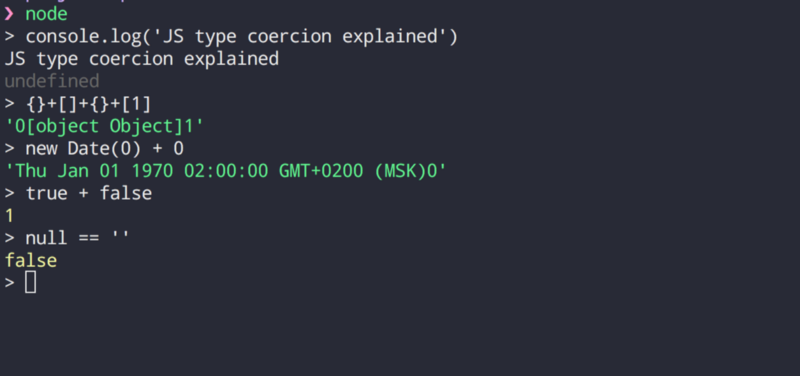
true + "1";   // "true1"
false + 1;    // 1
Explanation:
true + "1"→ string concatenationfalse + 1→ numeric addition (false → 0)
Example 8: Null and Undefined
null + "1";        // "null1"
undefined + "1";   // "undefined1"

null + 1;          // 1
undefined + 1;     // NaN
Why:
null → 0in numeric contextundefined → NaN
Example 9: Arrays (Hidden String Conversion)
[] + 1;        // "1"
[1,2] + 3;     // "1,23"
Steps:
[] → ""[1,2] → "1,2"
Example 10: Objects
{} + "1"; // "[object Object]1"
Object → toString() → "[object Object]"
Numeric Coercion (- * / %)
All non-string operators force numeric conversion.
"10" - 2;   // 8
"10" * 2;   // 20
"10" / 2;   // 5
"10" % 3;   // 1
Invalid numeric → NaN.
Comparison with Other Operators
Only + performs string concatenation.
"10" - 2; // 8
"10" * 2; // 20
"10" / 2; // 5
All other arithmetic operators force numeric coercion.
Mental Model
+= context-sensitive- Other arithmetic operators = always numeric
- Strings propagate to the right once introduced
- Parentheses are the only way to regain numeric addition mid-expression
Production-Grade Rule
Any expression containing + and untrusted input is type-unsafe unless explicitly converted.
Correct pattern:
Number(a) + Number(b)
Incorrect assumption:
a + b
Boolean Coercion (Truthiness)
Falsy values:
false0-00n""nullundefinedNaN
Everything else is truthy.
if ("0") { }     // executes
if ([]) { }      // executes
if ({}) { }      // executes
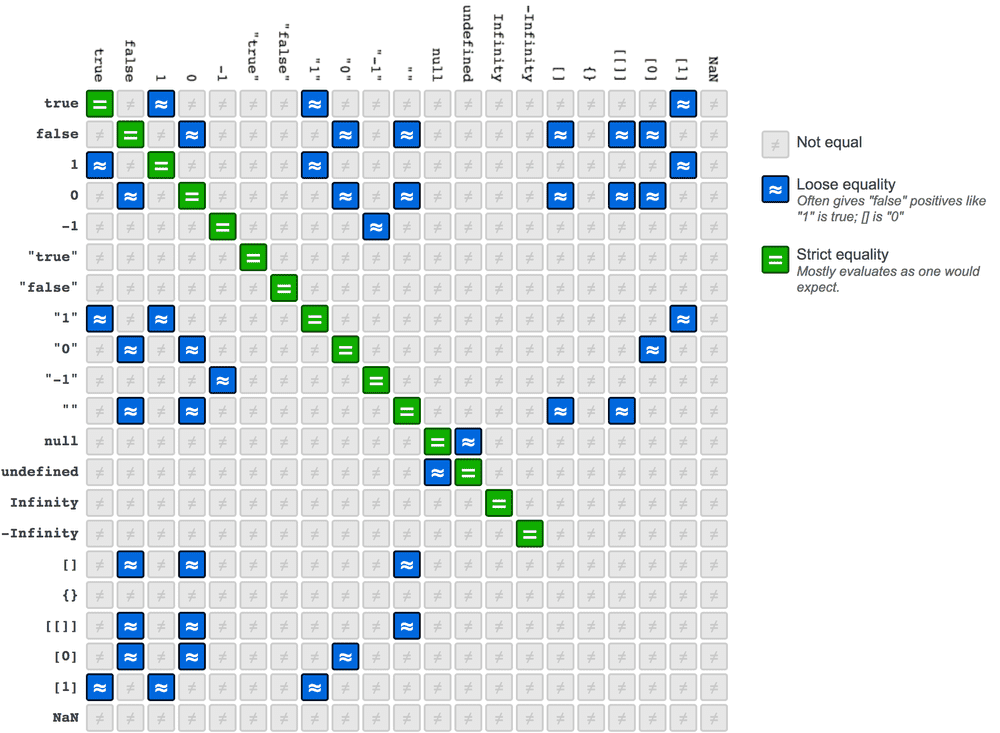
Equality Coercion (== vs ===)
Strict Equality (===)
- No coercion
- Type + value must match
"5" === 5; // false
Loose Equality (==)
Follows complex coercion rules.
Key cases:
"5" == 5;          // true
null == undefined; // true
false == 0;        // true
"" == 0;           // true
[] == 0;           // true
Object Comparison
[] == []; // false (reference)
Abstract Equality Algorithm (Simplified)
When using ==:
- If types equal → compare directly
null == undefined→ true- Number ↔ String → convert string to number
- Boolean → convert to number
- Object → call
valueOf()→toString()
Example:
[] == 0
[] -> "" -> 0
Explicit Type Coercion
To Number
Number("10");     // 10
+"10";            // 10
parseInt("10");   // 10
parseFloat("10.5"); // 10.5
Differences:
Number("10px");   // NaN
parseInt("10px"); // 10
To String
String(123);      // "123"
(123).toString();// "123"
To Boolean
Boolean(0);        // false
Boolean("hi");     // true
!!"hi";            // true
Object.is() vs ===
Object.is(NaN, NaN);     // true
NaN === NaN;             // false

Object.is(+0, -0);       // false
+0 === -0;               // true
Common Real-World Bugs
Accidental String Concatenation
let sum = a + b; // b from input → string
Boolean Misinterpretation
if ("false") { } // executes
Array Coercion
[] + []        // ""
[] + {}        // "[object Object]"
{} + []        // 0 (context-dependent)
Best-Practice Rules (Engineering Discipline)
- Prefer
===always - Explicitly convert types at boundaries (input, API, UI)
- Never rely on truthiness for business logic
- Use
Number.isNaN()instead ofisNaN() - Treat
nullandundefinedas semantically distinct - Avoid mixing
bigintandnumber - Assume
typeof nullis broken by design
Mental Model Summary (Software Engineering View)
- Primitives = immutable values, copied
- Objects = mutable references
- Coercion = engine optimization, not developer intent
=== legacy convenience==== correctness- Type safety in JS is behavioral, not enforced
- Robust systems reduce coercion surface area explicitly